
More time for your business.
Bring connected-channel orders and direct sales into one organised workflow. Find the information you need to prepare the work, instead of piecing your day together from different browser tabs.
Take control of sales, stock and orders across multiple marketplaces in one platform. Connect Etsy, eBay, Shopify and direct sales with production, shipping and your business results.
A sale can start on Etsy, eBay, Shopify or in a conversation with a customer. Managing it should continue in the same place.
Virthuos brings orders, products, stock and preparation together in your business workspace. See where each order came from, follow its status and understand what needs to happen to deliver it. Information no longer depends on searching across stores and keeping parallel lists.
The result is an operation that’s easier to follow: your team knows what arrived, what’s reserved, what needs producing and what can ship. And you gain the context to set priorities.
See your operations on the dashboard ↗
Bring connected-channel orders and direct sales into one organised workflow. Find the information you need to prepare the work, instead of piecing your day together from different browser tabs.

Distinguish stock on hand, reserved quantities and availability. When a sale arrives, stock context helps you see what you can prepare and what still needs producing or replenishing.

Compare channel activity, track products and destinations, and connect sales with recorded costs. Build an information base for deciding where to focus your attention, capacity and investment.
As sales grow, so do spreadsheets and browser tabs. Virthuos connects the information your team needs to turn every order into a clear next step.
Know what arrived, what needs producing and what you can ship. Your team works with the same order status.
Find your plan↗
| Order | Channel | Preparation | Status |
|---|---|---|---|
| #1048 · Ceramic Studio | Etsy | 2 of 2 units | Ready to ship |
| #1047 · Forma Object | Shopify | 1 unit in production | In production |
| #1046 · Studio Arc | eBay | Stock reserved | In preparation |
An overview of sales momentum and the work waiting for your team. From the period’s results to the next order to prepare, start your day with your priorities in view.
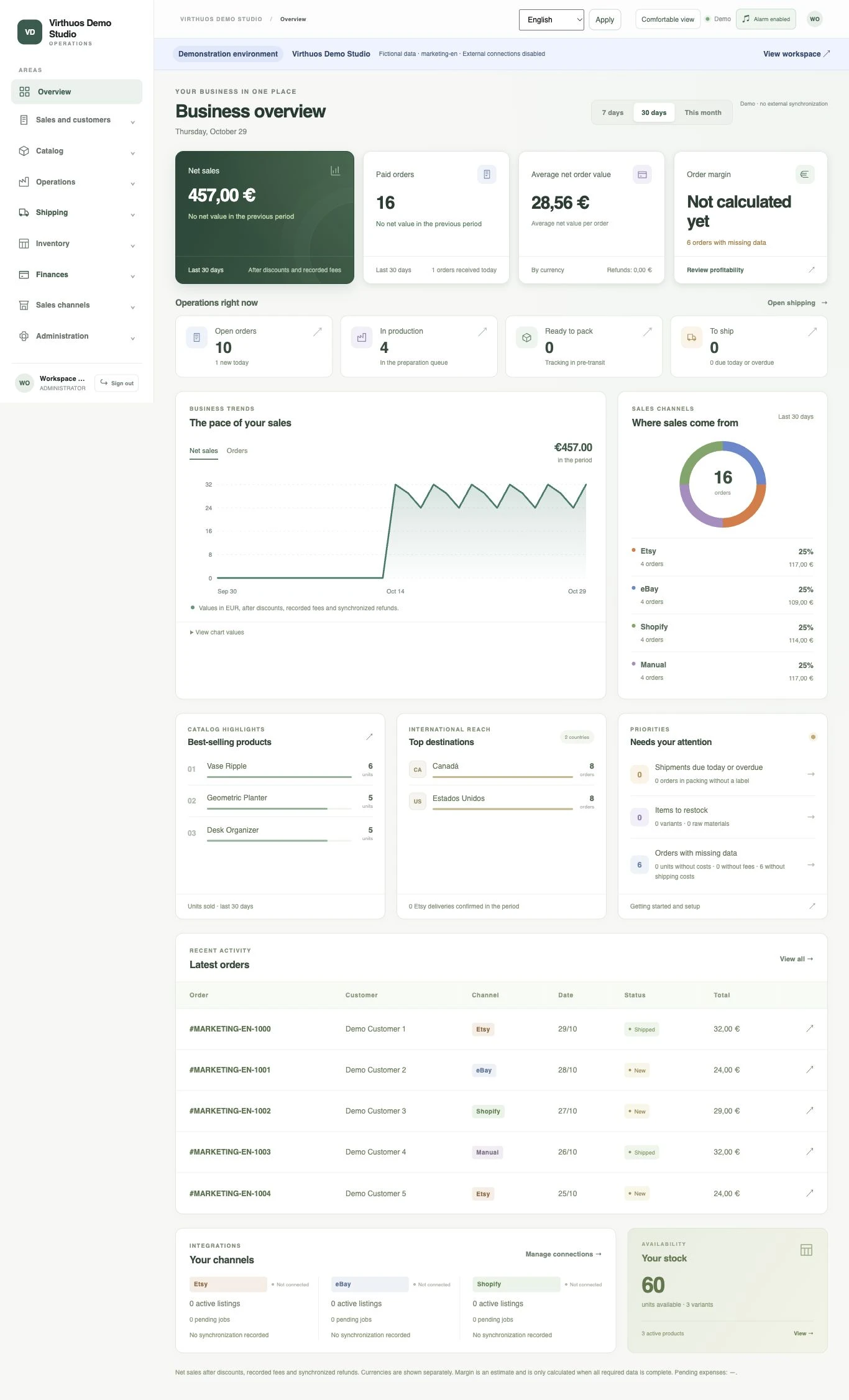 Enlarge dashboard ↗
Track net sales, paid orders and average order value. See the period’s trend and channel distribution, with currencies clearly identified.
Review open orders, production, preparation and shipping. Move from the overview to the relevant work area to keep each order moving.
Identify items to replenish, shipping deadlines and missing data. Alerts help direct attention to the operational points that need a closer look.
The essentials of your working day, designed to work together.

Organise products, variants, SKUs, prices, images and attributes in one central catalogue. Match store items to your business catalogue and give your team a consistent reference for identifying sales and preparing each order.

Distinguish stock on hand, reserved quantities and available units. Review movements and minimum levels for products and materials to plan replenishment. Connected channels receive quantity updates through their respective synchronisation queues.
Track orders from different channels and manual sales in the same operation. Review items, quantities, customers, sources and preparation status. Your team keeps the order’s context from arrival to shipping confirmation.

Turn stock shortages into visible work. Connect production to order requirements, track statuses and quantities, and see when units are ready. Production priorities stay connected to what you need to deliver.

Bring together shipping details, labels, tracking and dispatch confirmation. Follow preparation work and order deadlines. Prepare customs documents using your business details; automatic carrier label generation is being prepared.

Connect sales with recorded costs and expenses to follow business performance. Explore reports by product, channel, country and currency. Identify missing data and review margin estimates with the context you need to decide.
Bring your stores together in one central operation. Each connection respects the permissions and capabilities of its channel.
Prepare my channels ↗Connections are configured per business. Available features vary by channel and plan.Order imports, SKU mapping and synchronisation of stock and content for linked listings.
Paid orders, stock reservations, quantity updates and tracking after shipping confirmation.
Order imports and reconciliation, SKU-based product matching and stock synchronisation at one location.
Record manual orders using the same stock, production and preparation process as the rest of your operation.
After the purchase, there’s stock to confirm, work to organise and a delivery to prepare. Virthuos helps connect those steps so every sale moves forward.
Imagine a morning with orders on Etsy, eBay and your Shopify store. Instead of treating each store as a separate operation, your team follows connected-channel orders in one workspace, with products identified and preparation status visible.
I want more control ↗See the source channel, sold items and variants, quantities and shipping details. Manual order entry brings direct sales into the same process.
Track the stock needed for each order. If units are missing, organise production; if they’re available, move ahead with preparation.
Bring shipping details together, record tracking and confirm dispatch. Updates sent to the channel follow the capabilities and permissions of its integration.
Review sales, recorded costs and expenses to follow the result. Reports help you understand which products and channels account for more of your business activity.
A guided journey to prepare your workspace, set preferences and start with the right information.
Compare the features and capacity your business needs. Limits and prices come from the published catalogue.
Create an account and enter your business details. Your setup is saved.
Review the amount and continue to secure payment with Revolut Merchant when billing is enabled.
Choose your currency, time zone, channels, catalogue and shipping preferences. Set things up at your own pace.
We’re preparing the next stage. You can create an account and save your application. Billing and workspace availability will be enabled when the service is ready.
Organising your operation also means knowing who can do what, what changed and which business the data belongs to.
Assign access to operational areas according to each person’s responsibilities.
Data, files and credentials are kept separate between businesses using the service.
Relevant movements and actions are recorded to help you follow the work.
Compare published plans and choose the right resources for your business.
For people who manage their business alone.
Billed monthly · EUR
Choose Solo ↗YOUR WORKSPACE INCLUDESFor a small team with multiple channels.
Billed monthly · EUR
Choose Studio ↗YOUR WORKSPACE INCLUDESFor businesses with higher volumes.
Billed monthly · EUR
Choose Growth ↗YOUR WORKSPACE INCLUDESEUR is the main currency. ECB reference rates · . On days without a new publication, the latest available rate applies.
Prices, billing periods and resources are updated from the Virthuos administration catalogue. The amount and applicable terms are reviewed before payment. Live billing is still being activated.
Behind a simple experience are rules that help keep information consistent.
An order affects availability before it leaves your business.
Channel orders are reconciled using their order identifiers.
Synchronisation queues let you track pending updates and integration failures.
Choosing a platform deserves clear information. Start here.
Still have a question? Talk to us ↗A management platform for businesses that sell physical products. It brings catalogue, variants, stock, orders, production, shipping and financial monitoring together in your business workspace.
Independent brands, makers, studios and small teams that need to organise operations and manage sales across channels, while keeping control of stock and work to be done.
The platform includes Etsy, eBay and Shopify integrations, subject to store permissions and the channels included in your plan. You can also record manual orders. Each integration has its own set of capabilities.
Yes. Connected-channel orders and manual sales are organised in your business workspace with their source channel identified. Track order preparation, stock and business activity without managing each channel as a separate operation. Channel capacity depends on your plan and configured connections.
Net sales, paid orders, average order value, sales trends and channel distribution. The operations view shows open orders, production, preparation, shipping and points needing attention. Values depend on the period, currency and available data; incomplete margins are identified.
Available stock is calculated from stock on hand and order reservations. Connected integrations use synchronisation queues to update quantities. Updates depend on each marketplace’s APIs and permissions.
Orders reserve available stock. When units are missing, the system can create production work. Completing production feeds reservations, helping your team know what to produce and what can be prepared for shipping.
You can track preparation, labels, tracking and dispatch. Customs documents depend on your business details and rules. Automatic carrier label generation is still being prepared.
Yes. Displayed amounts, billing periods and resources are read from the catalogue published in the Virthuos administration area. The selection is checked on the server before preparing the application and payment.
Yes. EUR is the main currency. Choose USD, CAD or AUD to view an indicative conversion using the latest daily rate published by the European Central Bank. The rate’s date is shown with the plans. The base price and subscription amount remain in EUR; the display currency does not change your business details or business currency.
Choose a plan, create an account and enter your business details. The journey prepares payment with Revolut Merchant and lets you save your initial configuration. During launch, billing and workspace availability depend on service activation.
Each operational workspace has separate data, files, credentials and permissions. Access to application areas depends on each user’s assigned profile.
No. Financial monitoring helps analyse sales, costs, expenses and results. Tax invoicing and accounting should be handled with the appropriate tools and professionals for your business.
Yes. Prepare your catalogue, set preferences and start with manual orders. Store connections are configured later with their own consent and credentials.
Identification and contact details, country, currency, time zone and business preferences. You can then choose channels, catalogue preparation, shipping and your team. Configuration is saved so you can continue later.
Questions about your channels, operations or the right plan? Leave your contact details and tell us about your business.
More room to create. More context to grow.